
is now in public beta!
Published on: October 10, 2025
13 min read
How we built a structured Streamlit Application Framework in Snowflake
Want to transform development from chaos to compliance? Learn how we implemented governance early on rather than retrofitting when maintenance costs climb exponentially.


Recently, the GitLab Data team transformed scattered Streamlit applications into a unified, secure, and scalable solution for our Snowflake environment. To accomplish this, we packed Python, Snowflake, and Streamlit together with GitLab. Follow along on this journey and discover the results we achieved, and learn how you can, too.
The challenge
Imagine this scenario: Your organization has dozens of Streamlit applications across different environments, running various Python versions, connecting to sensitive data with inconsistent security practices. Some apps work, others break mysteriously, and nobody knows who built what or how to maintain them.
This was exactly the challenge our data team faced. Applications were being created in isolation, with no standardization, no security oversight, and no clear deployment process. The result? A compliance nightmare and a maintenance burden that was growing exponentially.
      ================================================================================
✅ Snowflake CLI successfully installed and configured!
Connection: gitlab_streamlit
User: [email protected]
Account: gitlab
================================================================================
Using virtualenv: /Users/YOU/repos/streamlit/.venv
📚 Installing project dependencies...
Installing dependencies from lock file
No dependencies to install or update
✅ Streamlit environment prepared!
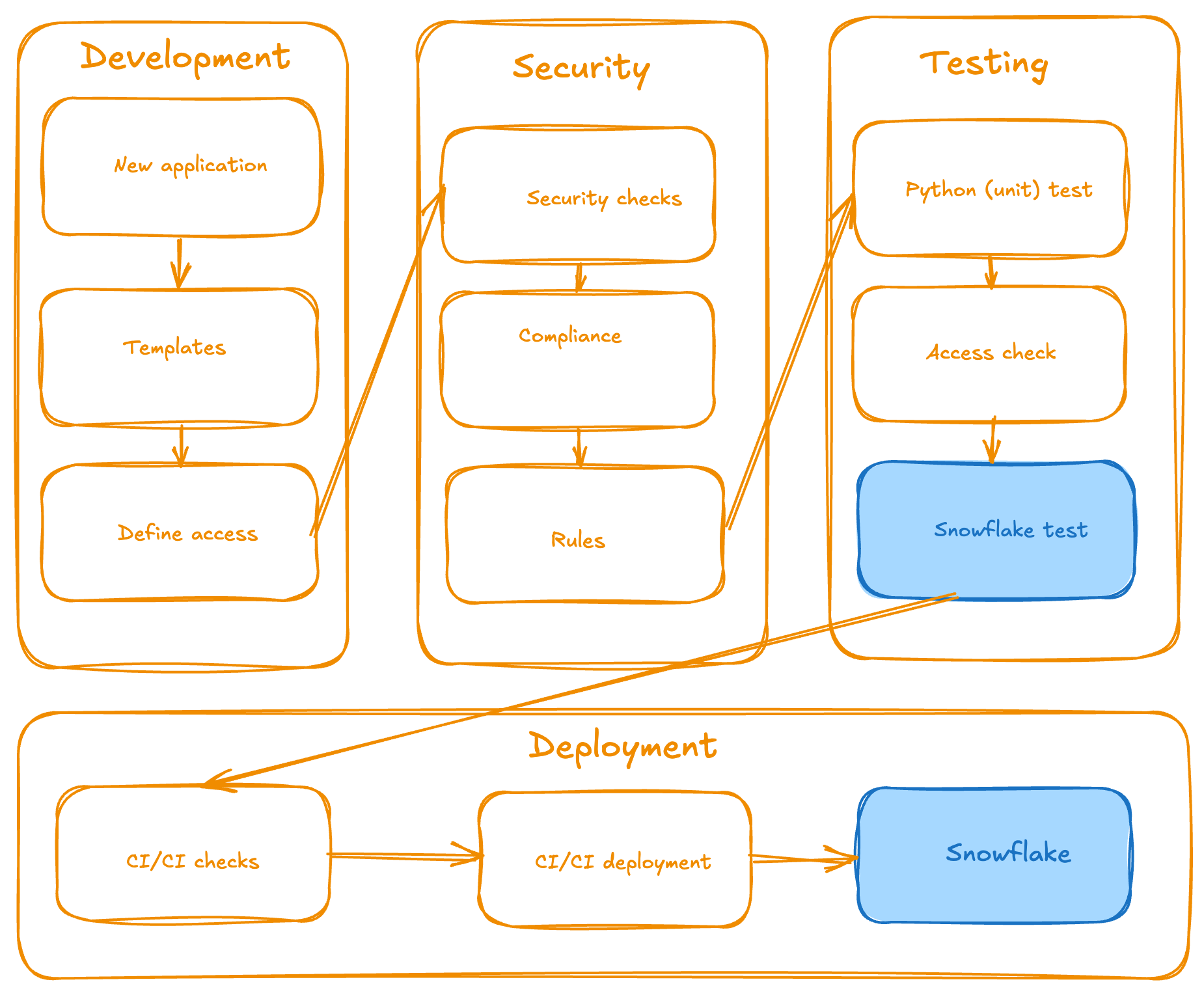
- Automated CI/CD pipelines: Handle testing, code review, and deployment from development to production.
- Secure sandbox environments: Provide for safe development and testing before production deployment.
      ╰─$ make streamlit-rules
🔍 Running Streamlit compliance check...
================================================================================
CODE COMPLIANCE REPORT
================================================================================
Generated: 2025-07-09 14:01:16
Files checked: 1

SUMMARY:
✅ Passed: 1
❌ Failed: 0
Success Rate: 100.0%

APPLICATION COMPLIANCE SUMMARY:
📱 Total Applications Checked: 1
⚠️ Applications with Issues: 0
📊 File Compliance Rate: 100.0%

DETAILED RESULTS BY APPLICATION:
...
- Template-based application creation: Ensures consistency across all applications and pages.
      ╰─$ make streamlit-new-page STREAMLIT_APP=sales_dashboard STREAMLIT_PAGE_NAME=analytics
📝 Generating new Streamlit page: analytics for app: sales_dashboard
📃 Create new page from template:
Page name: analytics
App directory: sales_dashboard
Template path: page_template.py
✅ Successfully created 'analytics.py' in 'sales_dashboard' directory from template
- Poetry-based dependency management: Prevents version conflicts and maintains clean environments.
- Organized project structure: Has dedicated folders for applications, templates, compliance rules, and configuration management.
      ├── src/
│   ├── applications/     # Folder for Streamlit applications
│   │   ├── main_app/     # Main dashboard application
│   │   ├── components/   # Shared components
│   │   └── <your_apps>/  # Your custom application
│   │   └── <your_apps2>/ # Your 2nd custom application
│   ├── templates/        # Application and page templates
│   ├── compliance/       # Compliance rules and checks
│   └── setup/            # Setup and configuration utilities
├── tests/                # Test files
├── config.yml            # Environment configuration
├── Makefile              # Build and deployment automation
└── README.md             # Main README.md file
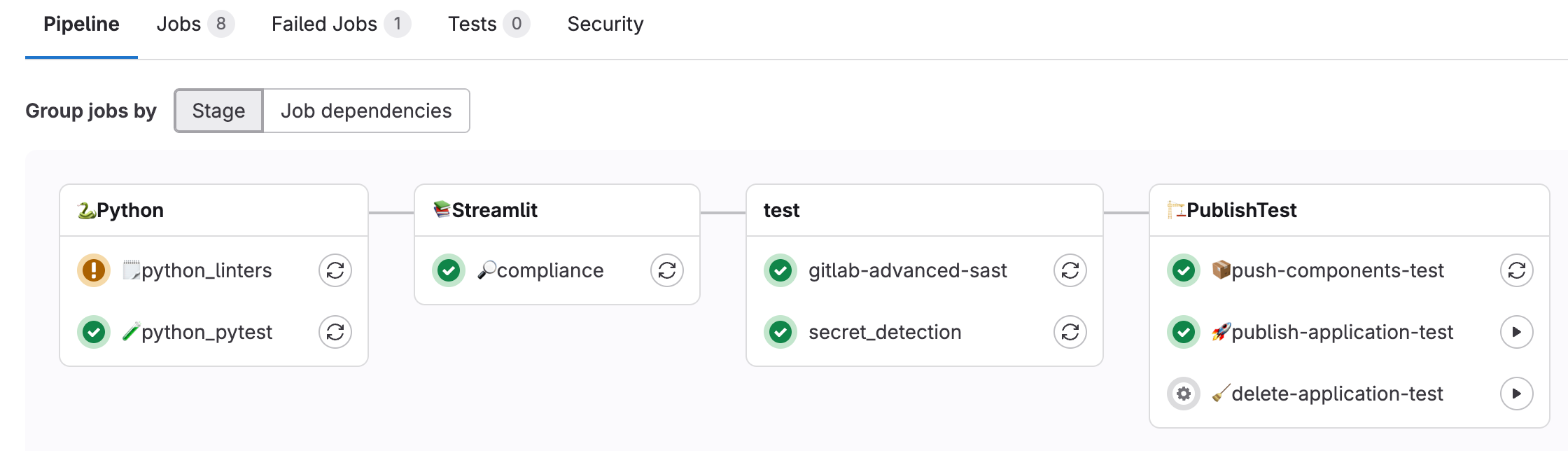
- Streamlined workflow: Takes local development through testing schema to production, all automated through GitLab CI/CD pipelines.
      class_rules:
  - name: "Inherit code for the page from GitLabDataStreamlitInit"
    description: "All Streamlit apps must inherit from GitLabDataStreamlitInit"
    severity: "error"
    required: true
    class_name: "*"
    required_base_classes:
      - "GitLabDataStreamlitInit"
    required_methods:
      - "__init__"
      - "set_page_layout"
      - "setup_ui"
      - "run"

function_rules:
  - name: "Main function required"
    description: "Must have a main() function"
    severity: "error"
    required: true
    function_name: "main"

import_rules:
  - name: "Import GitLabDataStreamlitInit"
    description: "Must import the mandatory base class"
    severity: "error"
    required: true
    module_name: "gitlab_data_streamlit_init"
    required_items:
      - "GitLabDataStreamlitInit"
  - name: "Import streamlit"
    description: "Must import streamlit library"
    severity: "error"
    required: true
    module_name: "streamlit"

file_rules:
  - name: "Snowflake configuration required (snowflake.yml)"
    description: "Each application must have a snowflake.yml configuration file"
    severity: "error"
    required: true
    file_pattern: "**/applications/**/snowflake.yml"
    base_path: ""
  - name: "Snowflake environment required (environment.yml)"
    description: "Each application must have a environment.yml configuration file"
    severity: "error"
    required: true
    file_pattern: "**/applications/**/environment.yml"
    base_path: ""
  - name: "Share specification required (share.yml)"
    description: "Each application must have a share.yml file"
    severity: "warning"
    required: true
    file_pattern: "**/applications/**/share.yml"
    base_path: ""
  - name: "README.md required (README.md)"
    description: "Each application should have a README.md file with a proper documentation"
    severity: "error"
    required: true
    file_pattern: "**/applications/**/README.md"
    base_path: ""
  - name: "Starting point recommended (dashboard.py)"
    description: "Each application must have a dashboard.py as a starting point"
    severity: "warning"
    required: true
    file_pattern: "**/applications/**/dashboard.py"
    base_path: ""

sql_rules:
  - name: "SQL files must contain only SELECT statements"
    description: "SQL files and SQL code in other files should only contain SELECT statements for data safety"
    severity: "error"
    required: true
    file_extensions: [".sql", ".py"]
    select_only: true
    forbidden_statements:
      - ....
    case_sensitive: false
  - name: "SQL queries should include proper SELECT statements"
    description: "When SQL is present, it should contain proper SELECT statements"
    severity: "warning"
    required: false
    file_extensions: [".sql", ".py"]
    required_statements:
      - "SELECT"
    case_sensitive: false

share_rules:
  - name: "Valid functional roles in share.yml"
    description: "Share.yml files must contain only valid functional roles from the approved list"
    severity: "error"
    required: true
    file_pattern: "**/applications/**/share.yml"
    valid_roles:
      - ...
    safe_data_roles:
      - ...
  - name: "Share.yml file format validation"
    description: "Share.yml files must follow the correct YAML format structure"
    severity: "error"
    required: true
    file_pattern: "**/applications/**/share.yml"
    required_keys:
      - "share"
    min_roles: 1
    max_roles: 10
With one command running:
╰─$ make streamlit-rules
We can verify all the rules we have created and validate that the developers (who are building a Streamlit application) are following the policy specified by the creators (who determine the policies and building blocks of the framework), and that all the building blocks are in the right place. This ensures consistent behavior across all Streamlit applications.
      🔍 Running Streamlit compliance check...
================================================================================
CODE COMPLIANCE REPORT
================================================================================
Generated: 2025-08-18 17:05:12
Files checked: 4

SUMMARY:
✅ Passed: 4
❌ Failed: 0
Success Rate: 100.0%

APPLICATION COMPLIANCE SUMMARY:
📱 Total Applications Checked: 1
⚠️ Applications with Issues: 0
📊 File Compliance Rate: 100.0%

DETAILED RESULTS BY APPLICATION:
================================================================================
✅ PASS APPLICATION: main_app
------------------------------------------------------------
📁 FILES ANALYZED (4):
✅ dashboard.py
📦 Classes: SnowflakeConnectionTester
🔧 Functions: main
📥 Imports: os, pwd, gitlab_data_streamlit_init, snowflake.snowpark.exceptions, streamlit

✅ show_streamlit_apps.py
📦 Classes: ShowStreamlitApps
🔧 Functions: main
📥 Imports: pandas, gitlab_data_streamlit_init, snowflake_session, streamlit

✅ available_packages.py
📦 Classes: AvailablePackages
🔧 Functions: main
📥 Imports: pandas, gitlab_data_streamlit_init, streamlit

✅ share.yml
👥 Share Roles: snowflake_analyst_safe

📄 FILE COMPLIANCE FOR MAIN_APP:
✅ Required files found:
✓ snowflake.yml
✓ environment.yml
✓ share.yml
✓ README.md
✓ dashboard.py

RULES CHECKED:
----------------------------------------
Class Rules (1):
- Inherit code for the page from GitLabDataStreamlitInit (error)

Function Rules (1):
- Main function required (error)

Import Rules (2):
- Import GitLabDataStreamlitInit (error)
- Import streamlit (error)

File Rules (5):
- Snowflake configuration required (snowflake.yml) (error)
- Snowflake environment required (environment.yml) (error)
- Share specification required (share.yml) (warning)
- README.md required (README.md) (error)
- Starting point recommended (dashboard.py) (warning)

SQL Rules (2):
- SQL files must contain only SELECT statements (error)
🗄 SELECT-only mode enabled
🚨 Forbidden: INSERT, UPDATE, DELETE, DROP, ALTER...
- SQL queries should include proper SELECT statements (warning)

Share Rules (2):
- Valid functional roles in share.yml (error)
👥 Valid roles: 15 roles defined
🔒 Safe data roles: 11 roles
- Share.yml file format validation (error)
------------------------------------------------------------
✅ Compliance check passed
-----------------------------------------------------------
Developer experience that works
Whether you prefer your favorite IDE, a web-based development environment, or Snowflake Snowsight, the experience remains consistent. The framework provides:
- Template-driven development: New applications and pages are created through standardized templates, ensuring consistency and best practices from day one. No more scattered design and elements.
      ╰─$ make streamlit-new-app NAME=sales_dashboard
🔧 Configuration Environment: TEST
📝 Configuration File: config.yml
📜 Config Loader Script: ./setup/get_config.sh
🐍 Python Version: 3.12
📁 Applications Directory: ./src/applications
🗄 Database: ...
📊 Schema: ...
🏗 Stage: ...
🏭 Warehouse: ...
🆕 Creating new Streamlit app: sales_dashboard
Initialized the new project in ./src/applications/sales_dashboard
- Poetry package management: All dependencies are managed through Poetry, creating isolated environments that won't disrupt your existing Python setup.
      [tool.poetry]
name = "GitLab Data Streamlit"
version = "0.1.1"
description = "GitLab Data Team Streamlit project"
authors = ["GitLab Data Team <*****@gitlab.com>"]
readme = "README.md"

[tool.poetry.dependencies]
python = "<3.13,>=3.12"
snowflake-snowpark-python = "==1.32.0"
snowflake-connector-python = {extras = ["development", "pandas", "secure-local-storage"], version = "^3.15.0"}
streamlit = "==1.22.0"
watchdog = "^6.0.0"
types-toml = "^0.10.8.20240310"
pytest = "==7.0.0"
black = "==25.1.0"
importlib-metadata = "==4.13.0"
pyyaml = "==6.0.2"
python-qualiter = "*"
ruff = "^0.1.0"
types-pyyaml = "^6.0.12.20250516"
jinja2 = "==3.1.6"

[build-system]
requires = ["poetry-core"]
build-backend = "poetry.core.masonry.api"
- Multi-page application support: Creators can easily build complex applications with multiple pages and add new libraries as needed. Multi-page applications are part of the framework and a developer is focusing on the logic, not the design and structuring.
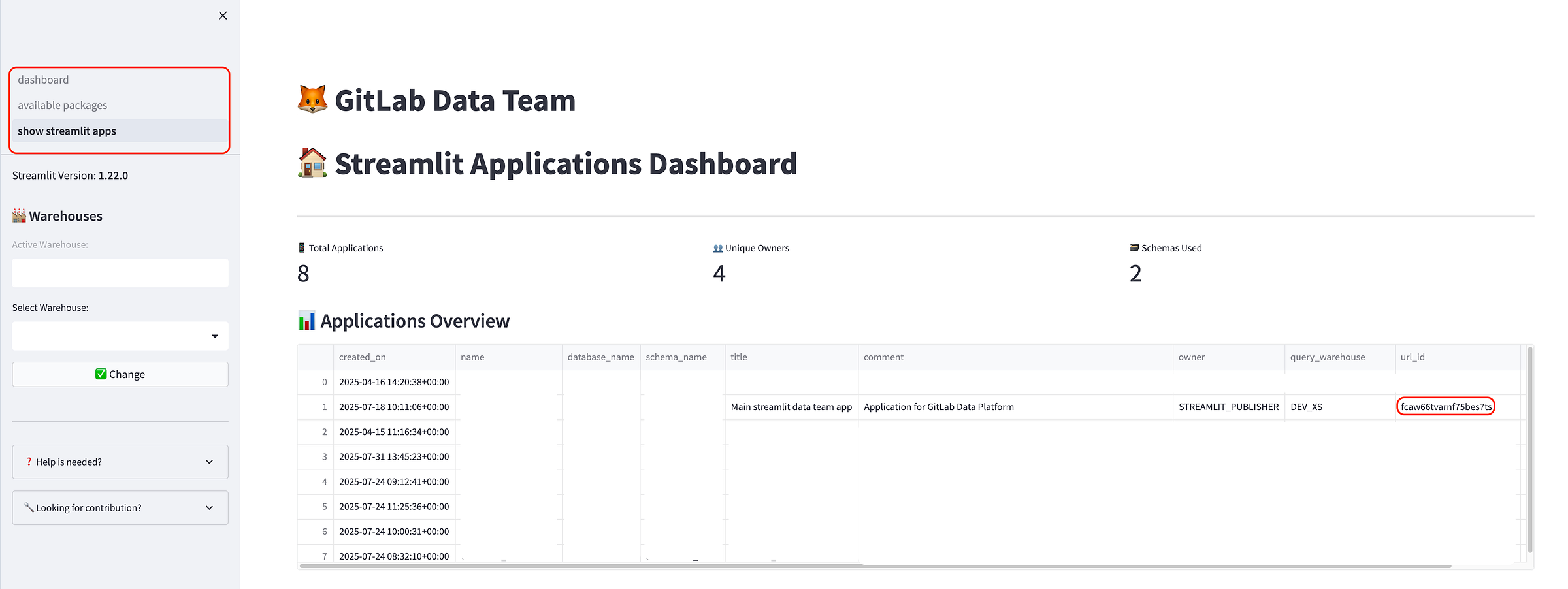
      make streamlit-push-test APPLICATION_NAME=sales_dashboard
📤 Deploying Streamlit app to test environment: sales_dashboard
...
------------------------------------------------------------------------------------------------------------
🔗 Running share command for application: sales_dashboard
Running commands to grant shares
🚀 Executing: snow streamlit share sales_dashboard with SOME_NICE_ROLE
✅ Command executed successfully
📊 Execution Summary: 1/1 commands succeeded
- Comprehensive Makefile: All common commands are wrapped in simple Makefile commands, from local development to testing and deployment, including CI/CD pipelines.
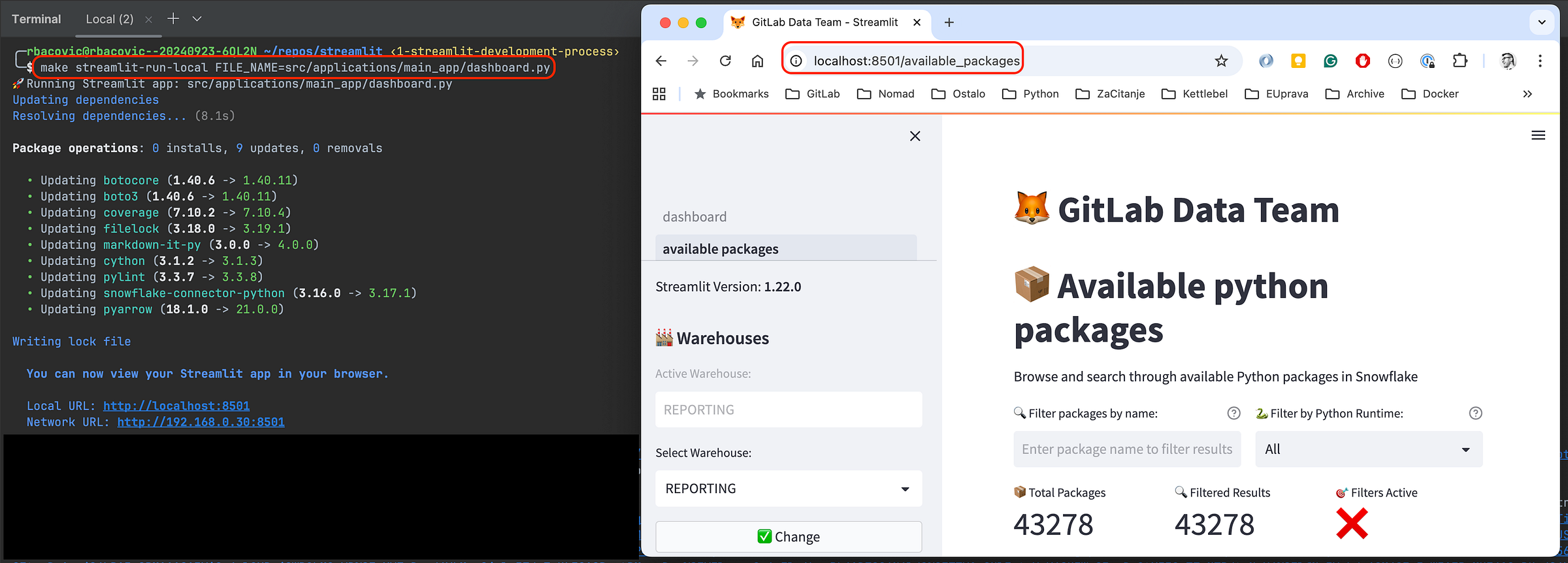
- Safe local development: Everything runs in isolated Poetry environments, protecting your system while providing production-like experiences.
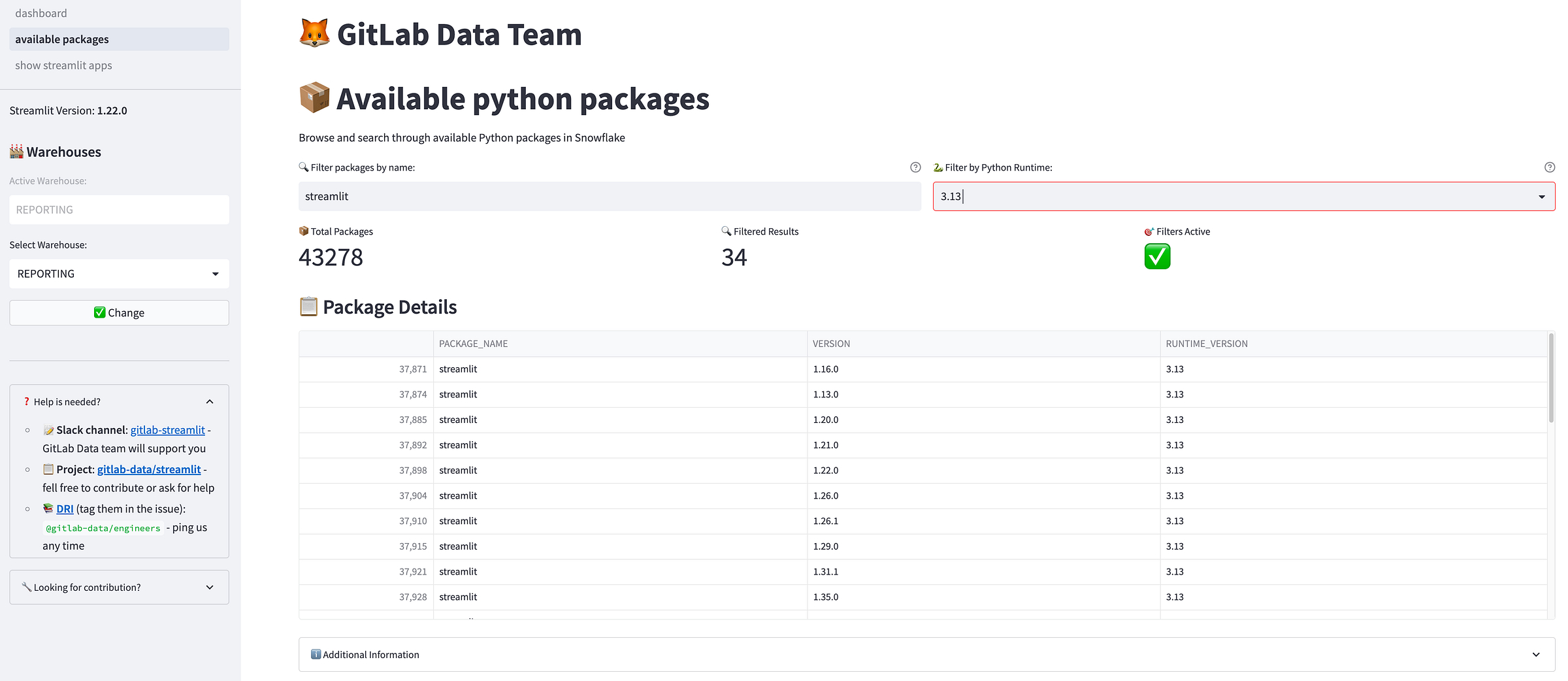
The bigger picture
This framework represents more than just a technical solution — it's a paradigm shift toward treating data applications as first-class citizens in your enterprise (data) architecture. By providing structure without sacrificing flexibility, the GitLab Data team created an environment where anyone in the company with minimal technical knowledge can innovate rapidly while maintaining the highest standards of security and compliance.
What's next?
We're continuing to enhance the framework based on user feedback and emerging needs. Future improvements include expanded template libraries, enhanced monitoring capabilities, more flexibility, and a smoother user experience. The goal isn't just to solve today's problems, but to create a foundation that scales with your organization's growing data application needs.
Summary
The GitLab Data Team transformed dozens of scattered, insecure Streamlit applications with no standardization into a unified, enterprise-grade framework that separates roles cleanly:
- Maintainers handle infrastructure and security.
- Creators focus on building applications without deployment headaches.
- Viewers access polished, compliant apps.
And we used these building blocks:
- Automated CI/CD pipelines
- Fully collaborative and versioned code in git
- Template-based development
- Built-in security compliance, testing
- Poetry-managed environments We eliminated the maintenance nightmare while enabling rapid innovation — proving that you can have both structure and flexibility when you treat data applications as first-class enterprise assets rather than throwaway prototypes.
We want to hear from you
Enjoyed reading this blog post or have questions or feedback? Share your thoughts by creating a new topic in the GitLab community forum.
Share your feedback