
is now in public beta!
Published on: December 3, 2025
13 min read
Guide: Migrate from Azure DevOps to GitLab
Learn how to migrate from Azure DevOps to GitLab using GitLab Professional Services migration tools — from planning and execution to follow-up tasks.


Migrating from Azure DevOps to GitLab can seem like a daunting task, but with the right approach and tools, it can be a smooth and efficient process. This guide will walk you through the steps needed to successfully migrate your projects, repositories, and pipelines from Azure DevOps to GitLab.
Overview
GitLab provides both Congregate (maintained by GitLab Professional Services organization) and a built-in Git repository import for migrating projects from Azure DevOps (ADO). These options support repository-by-repository or bulk migration and preserve git commit history, branches, and tags. With Congregate and professional services tools, we support additional assets such as wikis, work items, CI/CD variables, container images, packages, pipelines, and more (see this feature matrix). Use this guide to plan and execute your migration and complete post-migration follow-up tasks.
Enterprises migrating from ADO to GitLab commonly follow a multi-phase approach:
- Migrate repositories from ADO to GitLab using Congregate or GitLab's built-in repository migration.
- Migrate pipelines from Azure Pipelines to GitLab CI/CD.
- Migrate remaining assets such as boards, work items, and artifacts to GitLab Issues, Epics, and the Package and Container Registries.
High-level migration phases:
graph LR
    subgraph Prerequisites
        direction TB
        A["Set up identity provider (IdP) and<br/>provision users"]
        A --> B["Set up runners and<br/>third-party integrations"]
        B --> I["Users enablement and<br/>change management"]
    end

    subgraph MigrationPhase["Migration phase"]
        direction TB
        C["Migrate source code"]
        C --> D["Preserve contributions and<br/> format history"]
        D --> E["Migrate work items and<br/>map to <a href="https://docs.gitlab.com/topics/plan_and_track/">GitLab Plan <br/>and track work"]
    end

    subgraph PostMigration["Post-migration steps"]
        direction TB
        F["Create or translate <br/>ADO pipelines to GitLab CI"]
        F --> G["Migrate other assets<br/>packages and container images"]
        G --> H["Introduce <a href="https://docs.gitlab.com/user/application_security/secure_your_application/">security</a> and<br/>SDLC improvements"]
    end

    Prerequisites --> MigrationPhase
    MigrationPhase --> PostMigration

    style A fill:#FC6D26
    style B fill:#FC6D26
    style I fill:#FC6D26
    style C fill:#8C929D
    style D fill:#8C929D
    style E fill:#8C929D
    style F fill:#FFA500
    style G fill:#FFA500
    style H fill:#FFA500
Planning your migration
To plan your migration, ask these questions:
- How soon do we need to complete the migration?
- Do we understand what will be migrated?
- Who will run the migration?
- What organizational structure do we want in GitLab?
- Are there any constraints, limitations, or pitfalls that need to be taken into account?
Determine your timeline, as it will largely dictate your migration approach. Identify champions or groups familiar with both ADO and GitLab platforms (such as early adopters) to help drive adoption and provide guidance.
Inventory what you need to migrate:
- The number of repositories, pull requests, and contributors
- The number and complexity of work items and pipelines
- Repository sizes and dependency relationships
- Critical integrations and runner requirements (agent pools with specific capabilities)
Use GitLab Professional Services's Evaluate tool to produce a complete inventory of your entire Azure DevOps organization, including repositories, PR counts, contributor lists, number of pipelines, work items, CI/CD variables and more. If you're working with the GitLab Professional Services team, share this report with your engagement manager or technical architect to help plan the migration.
Migration timing is primarily driven by pull request count, repository size, and amount of contributions (e.g. comments in PR, work items, etc). For example, 1,000 small repositories with few PRs and limited contributors can migrate much faster than a smaller set of repositories containing tens of thousands of PRs and thousands of contributors. Use your inventory data to estimate effort and plan test runs before proceeding with production migrations.
Compare inventory against your desired timeline and decide whether to migrate all repositories at once or in batches. If teams cannot migrate simultaneously, batch and stagger migrations to align with team schedules. For example, in Professional Services engagements, we organize migrations into waves of 200-300 projects to manage complexity and respect API rate limits, both in GitLab and ADO.
GitLab's built-in repository importer migrates Git repositories (commits, branches, and tags) one-by-one. Congregate is designed to preserve pull requests (known in GitLab as merge requests), comments, and related metadata where possible; the simple built-in repository import focuses only on the Git data (history, branches, and tags).
Items that typically require separate migration or manual recreation:
- Azure Pipelines - create equivalent GitLab CI/CD pipelines (consult with CI/CD YAML and/or with CI/CD components). Alternatively, consider using AI-based pipeline conversion available in Congregate.
- Work items and boards - map to GitLab Issues, Epics, and Issue Boards.
- Artifacts, container images (ACR) - migrate to GitLab Package Registry or Container Registry.
- Service hooks and external integrations - recreate in GitLab.
- Permissions models differ between ADO and GitLab; review and plan permissions mapping rather than assuming exact preservation.
Review what each tool (Congregate vs. built-in import) will migrate and choose the one that fits your needs. Make a list of any data or integrations that must be migrated or recreated manually.
Who will run the migration?
Migrations are typically run by a GitLab group owner or instance administrator, or by a designated migrator who has been granted the necessary permissions on the destination group/project. Congregate and the GitLab import APIs require valid authentication tokens for both Azure DevOps and GitLab.
- Decide whether a group owner/admin will perform the migrations or whether you will grant a specific team/person delegated access.
- Ensure the migrator has correctly configured personal access tokens (Azure DevOps and GitLab) with the scopes required by your chosen migration tool (for example, api/read_repository scopes and any tool-specific requirements).
- Test tokens and permissions with a small pilot migration.
Note: Congregate leverages file-based import functionality for ADO migrations and requires instance administrator permissions to run (see our documentation). If you are migrating to GitLab.com, consider engaging Professional Services. For more information, see the Professional Services Full Catalog. Non-admin account cannot preserve contribution attribution!
What organizational structure do we want in GitLab?
While it's possible to map ADO structure directly to GitLab structure, it's recommended to rationalize and simplify the structure during migration. Consider how teams will work in GitLab and design the structure to facilitate collaboration and access management. Here is a way to think about mapping ADO structure to GitLab structure:
graph TD
    subgraph GitLab
        direction TB
        A["Top-level Group"]
        B["Subgroup (optional)"]
        C["Projects"]
        A --> B
        A --> C
        B --> C
    end

    subgraph AzureDevOps["Azure DevOps"]
        direction TB
        F["Organizations"]
        G["Projects"]
        H["Repositories"]
        F --> G
        G --> H
    end

    style A fill:#FC6D26
    style B fill:#FC6D26
    style C fill:#FC6D26
    style F fill:#8C929D
    style G fill:#8C929D
    style H fill:#8C929D
Recommended approach:
- Map each ADO organization to a GitLab group (or a small set of groups), not to many small groups. Avoid creating a GitLab group for every ADO team project. Use migration as an opportunity to rationalize your GitLab structure.
- Use subgroups and project-level permissions to group related repositories.
- Manage access to sets of projects by using GitLab groups and group membership (groups and subgroups) rather than one group per team project.
- Review GitLab permissions and consider SAML Group Links to implement an enterprise RBAC model for your GitLab instance (or a GitLab.com namespace).
ADO Boards and work items: State of migration
It's important to understand how work items migrate from ADO into GitLab Plan (issues, epics, and boards).
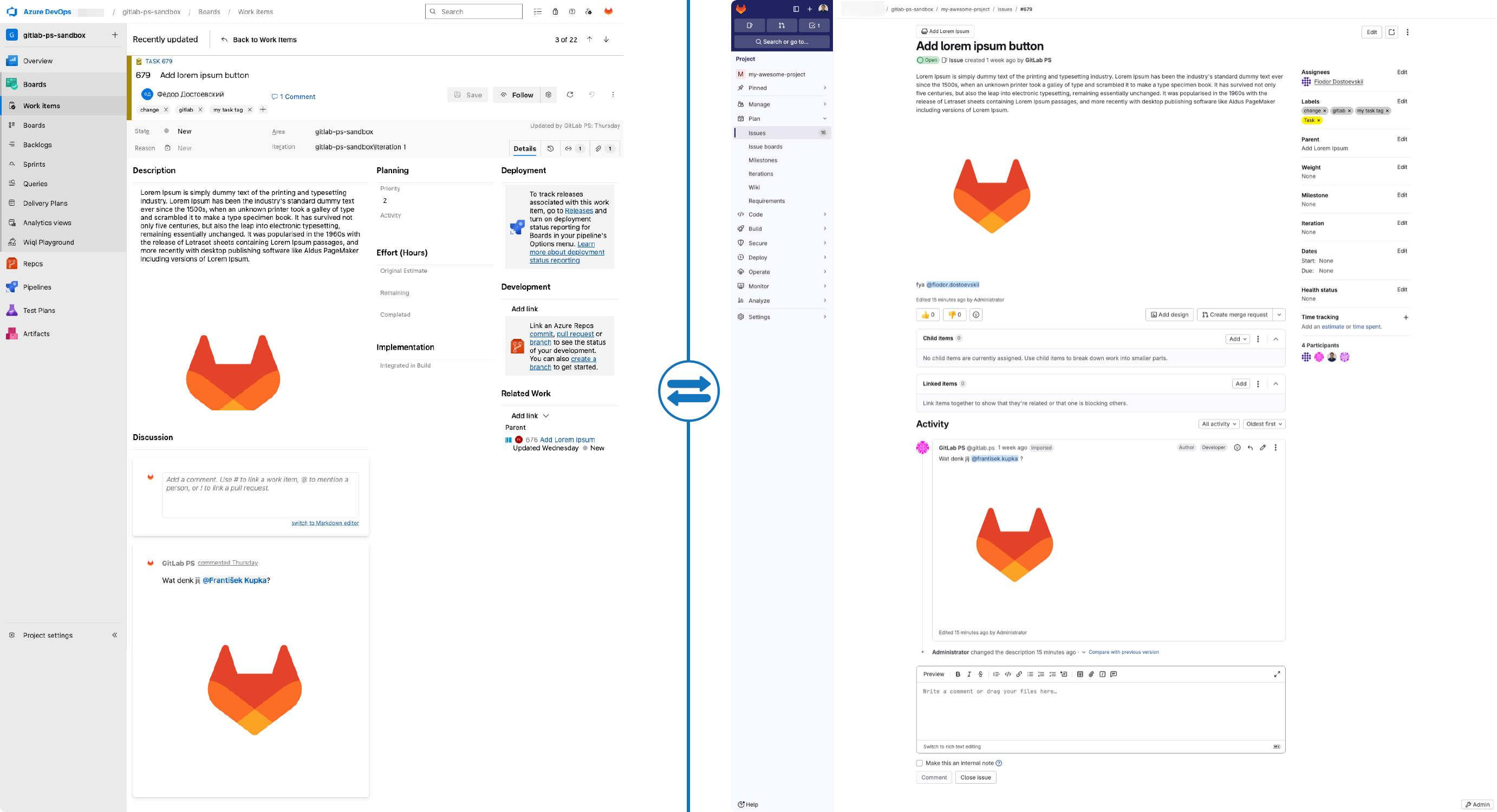
- ADO Boards and work items map to GitLab Issues, Epics, and Issue Boards. Plan how your workflows and board configurations will translate.
- ADO Epics and Features become GitLab Epics.
- Other work item types (e.g., user stories, tasks, bugs) become project-scoped issues.
- Most standard fields are preserved; selected custom fields can be migrated when supported.
- Parent-child relationships are retained so Epics reference all related issues.
- Links to pull requests are converted to merge request links to maintain development traceability.
Example: Migration of an individual work item to a GitLab Issue, including field accuracy and relationships:
Batching guidance:
- If you need to run migrations in batches, use your new group/subgroup structure to define batches (for example, by ADO organization or by product area).
- Use inventory reports to drive batch selection and test each batch with a pilot migration before scaling.
Pipelines migration
Congregate recently introduced AI-powered conversion for multi-stage YAML pipelines from Azure DevOps to GitLab CI/CD. This automated conversion works best for simple, single-file pipelines and is designed to provide a working starting point rather than a production-ready .gitlab-ci.yml file. The tool generates a functionally equivalent GitLab pipeline that you can then refine and optimize for your specific needs.
- Converts Azure Pipelines YAML to
.gitlab-ci.ymlformat automatically. - Best suited for straightforward, single-file pipeline configurations.
- Provides a boilerplate to accelerate migration, not a final production artifact.
- Requires review and adjustment for complex scenarios, custom tasks, or enterprise requirements.
- Does not support Azure DevOps classic release pipelines — convert these to multi-stage YAML first.
Repository owners should review the GitLab CI/CD documentation to further optimize and enhance their pipelines after the initial conversion.
Example of converted pipelines:
# azure-pipelines.yml

trigger:
  - main

variables:
  imageName: myapp

stages:
  - stage: Build
    jobs:
      - job: Build
        pool:
          vmImage: 'ubuntu-latest'
        steps:
          - checkout: self

          - task: Docker@2
            displayName: Build Docker image
            inputs:
              command: build
              repository: $(imageName)
              Dockerfile: '**/Dockerfile'
              tags: |
                $(Build.BuildId)

  - stage: Test
    jobs:
      - job: Test
        pool:
          vmImage: 'ubuntu-latest'
        steps:
          - checkout: self

          # Example: run tests inside the container
          - script: |
              docker run --rm $(imageName):$(Build.BuildId) npm test
            displayName: Run tests

  - stage: Push
    jobs:
      - job: Push
        pool:
          vmImage: 'ubuntu-latest'
        steps:
          - checkout: self

          - task: Docker@2
            displayName: Login to ACR
            inputs:
              command: login
              containerRegistry: '<your-acr-service-connection>'

          - task: Docker@2
            displayName: Push image to ACR
            inputs:
              command: push
              repository: $(imageName)
              tags: |
                $(Build.BuildId)
      # .gitlab-ci.yml
variables:
  imageName: myapp

stages:
  - build
  - test
  - push

build:
  stage: build
  image: docker:latest
  services:
    - docker:dind
  script:
    - docker build -t $imageName:$CI_PIPELINE_ID -f $(find . -name Dockerfile) .
  only:
    - main

test:
  stage: test
  image: docker:latest
  services:
    - docker:dind
  script:
    - docker run --rm $imageName:$CI_PIPELINE_ID npm test
  only:
    - main

push:
  stage: push
  image: docker:latest
  services:
    - docker:dind
  before_script:
    - docker login -u $CI_REGISTRY_USER -p $CI_REGISTRY_PASSWORD $CI_REGISTRY
  script:
    - docker tag $imageName:$CI_PIPELINE_ID $CI_REGISTRY/$CI_PROJECT_PATH/$imageName:$CI_PIPELINE_ID
    - docker push $CI_REGISTRY/$CI_PROJECT_PATH/$imageName:$CI_PIPELINE_ID
  only:
    - main
Final checklist:
- Decide timeline and batch strategy.
- Produce a full inventory of repositories, PRs, and contributors.
- Choose Congregate or the built-in import based on scope (PRs and metadata vs. Git data only).
- Decide who will run migrations and ensure tokens/permissions are configured.
- Identify assets that must be migrated separately (pipelines, work items, artifacts, and hooks) and plan those efforts.
- Run pilot migrations, validate results, then scale according to your plan.
Running your migrations
After planning, execute migrations in stages, starting with trial runs. Trial migrations help surface org-specific issues early and let you measure duration, validate outcomes, and fine-tune your approach before production.
What trial migrations validate:
- Whether a given repository and related assets migrate successfully (history, branches, tags; plus MRs/comments if using Congregate)
- Whether the destination is usable immediately (permissions, runners, CI/CD variables, integrations)
- How long each batch takes, to set schedules and stakeholder expectations
Downtime guidance:
- GitLab's built-in Git import and Congregate do not inherently require downtime.
- For production waves, freeze changes in ADO (branch protections or read-only) to avoid missed commits, PR updates, or work items created mid-migration.
- Trial runs do not require freezes and can be run anytime.
Batching guidance:
- Run trial batches back-to-back to shorten elapsed time; let teams validate results asynchronously.
- Use your planned group/subgroup structure to define batches and respect API rate limits.
Recommended steps:
- Create a test destination in GitLab for trials:
- GitLab.com: create a dedicated group/namespace (for example, my-org-sandbox)
- Self-managed: create a top-level group or a separate test instance if needed
- Prepare authentication:
- Azure DevOps PAT with required scopes.
- GitLab Personal Access Token with api and read_repository (plus admin access for file-based imports used by Congregate).
- Run trial migrations:
- Repos only: use GitLab's built-in import (Repo by URL)
- Repos + PRs/MRs and additional assets: use Congregate
- Post-trial follow-up:
- Verify repo history, branches, tags; merge requests (if migrated), issues/epics (if migrated), labels, and relationships.
- Check permissions/roles, protected branches, required approvals, runners/tags, variables/secrets, integrations/webhooks.
- Validate pipelines (
.gitlab-ci.yml) or converted pipelines where applicable.
- Ask users to validate functionality and data fidelity.
- Resolve issues uncovered during trials and update your runbooks.
- Network and security:
- If your destination uses IP allow lists, add the IPs of your migration host and any required runners/integrations so imports can succeed.
- Run production migrations in waves:
- Enforce change freezes in ADO during each wave.
- Monitor progress and logs; retry or adjust batch sizes if you hit rate limits.
- Optional: remove the sandbox group or archive it after you finish.
Terminology reference for GitLab and Azure DevOps
| GitLab | Azure DevOps | Similarities & Key Differences |
|---|---|---|
| Group | Organization | Top-level namespace, membership, policies. ADO org contains Projects; GitLab Group contains Subgroups and Projects. |
| Group or Subgroup | Project | Logical container, permissions boundary. ADO Project holds many repos; GitLab Groups/Subgroups organize many Projects. |
| Project (includes a Git repo) | Repository (inside a Project) | Git history, branches, tags. In GitLab, a "Project" is the repo plus issues, CI/CD, wiki, etc. One repo per Project. |
| Merge Request (MR) | Pull Request (PR) | Code review, discussions, approvals. MR rules include approvals, required pipelines, code owners. |
| Protected Branches, MR Approval Rules, Status Checks | Branch Policies | Enforce reviews and checks. GitLab combines protections + approval rules + required status checks. |
| GitLab CI/CD | Azure Pipelines | YAML pipelines, stages/jobs, logs. ADO also has classic UI pipelines; GitLab centers on .gitlab-ci.yml. |
| .gitlab-ci.yml | azure-pipelines.yml | Defines stages/jobs/triggers. Syntax/features differ; map jobs, variables, artifacts, and triggers. |
| Runners (shared/specific) | Agents / Agent Pools | Execute jobs on machines/containers. Target via demands (ADO) vs tags (GitLab). Registration/scoping differs. |
| CI/CD Variables (project/group/instance), Protected/Masked | Pipeline Variables, Variable Groups, Library | Pass config/secrets to jobs. GitLab supports group inheritance and masking/protection flags. |
| Integrations, CI/CD Variables, Deploy Keys | Service Connections | External auth to services/clouds. Map to integrations or variables; cloud-specific helpers available. |
| Environments & Deployments (protected envs) | Environments (with approvals) | Track deploy targets/history. Approvals via protected envs and manual jobs in GitLab. |
| Releases (tag + notes) | Releases (classic or pipelines) | Versioned notes/artifacts. GitLab Release ties to tags; deployments tracked separately. |
| Job Artifacts | Pipeline Artifacts | Persist job outputs. Retention/expiry configured per job or project. |
| Package Registry (NuGet/npm/Maven/PyPI/Composer, etc.) | Azure Artifacts (NuGet/npm/Maven, etc.) | Package hosting. Auth/namespace differ; migrate per package type. |
| GitLab Container Registry | Azure Container Registry (ACR) or others | OCI images. GitLab provides per-project/group registries. |
| Issue Boards | Boards | Visualize work by columns. GitLab boards are label-driven; multiple boards per project/group. |
| Issues (types/labels), Epics | Work Items (User Story/Bug/Task) | Track units of work. Map ADO types/fields to labels/custom fields; epics at group level. |
| Epics, Parent/Child Issues | Epics/Features | Hierarchy of work. Schema differs; use epics + issue relationships. |
| Milestones and Iterations | Iteration Paths | Time-boxing. GitLab Iterations (group feature) or Milestones per project/group. |
| Labels (scoped labels) | Area Paths | Categorization/ownership. Replace hierarchical areas with scoped labels. |
| Project/Group Wiki | Project Wiki | Markdown wiki. Backed by repos in both; layout/auth differ slightly. |
| Test reports via CI, Requirements/Test Management, integrations | Test Plans/Cases/Runs | QA evidence/traceability. No 1:1 with ADO Test Plans; often use CI reports + issues/requirements. |
| Roles (Owner/Maintainer/Developer/Reporter/Guest) + custom roles | Access levels + granular permissions | Control read/write/admin. Models differ; leverage group inheritance and protected resources. |
| Webhooks | Service Hooks | Event-driven integrations. Event names/payloads differ; reconfigure endpoints. |
| Advanced Search | Code Search | Full-text repo search. Self-managed GitLab may need Elasticsearch/OpenSearch for advanced features. |
We want to hear from you
Enjoyed reading this blog post or have questions or feedback? Share your thoughts by creating a new topic in the GitLab community forum.
Share your feedback