
is now in public beta!
Published on: February 25, 2025
10 min read
The ultimate guide to token management at GitLab
Learn all the steps in the end-to-end process of identifying, managing, and securing tokens for improved security across the software development lifecycle.


Imagine this: You are an engineer at a growing tech company, and it’s 2 a.m. when you get an urgent call. A critical deployment pipeline has failed, and your team is scrambling to figure out why. After hours of digging, you realize someone revoked a personal access token belonging to an engineer who left the company a week ago. This token was tied to several key automation processes, and now your entire system is in chaos. How do you make sure it does not happen again?
Follow this guide, which takes GitLab customers through the end-to-end process of identifying, managing, and securing their tokens. It is meant to be a handy supplement to the extensive token overview documentation for GitLab administrators, developers, and security teams who need to ensure proper token management within their projects.
Here's what is covered in this guide:
- How to select the right token for the job
- Token types
- Discovering your tokens
- Managing tokens in the GitLab UI and API
- Token rotation and expiration management
- Token management best practices
How to select the right token for the job
Choosing the right token ensures optimal security and functionality based on your use case. Tokens can be used for authenticating API requests, automating CI/CD pipelines, integrating third-party tools, managing deployments and repositories, and more.
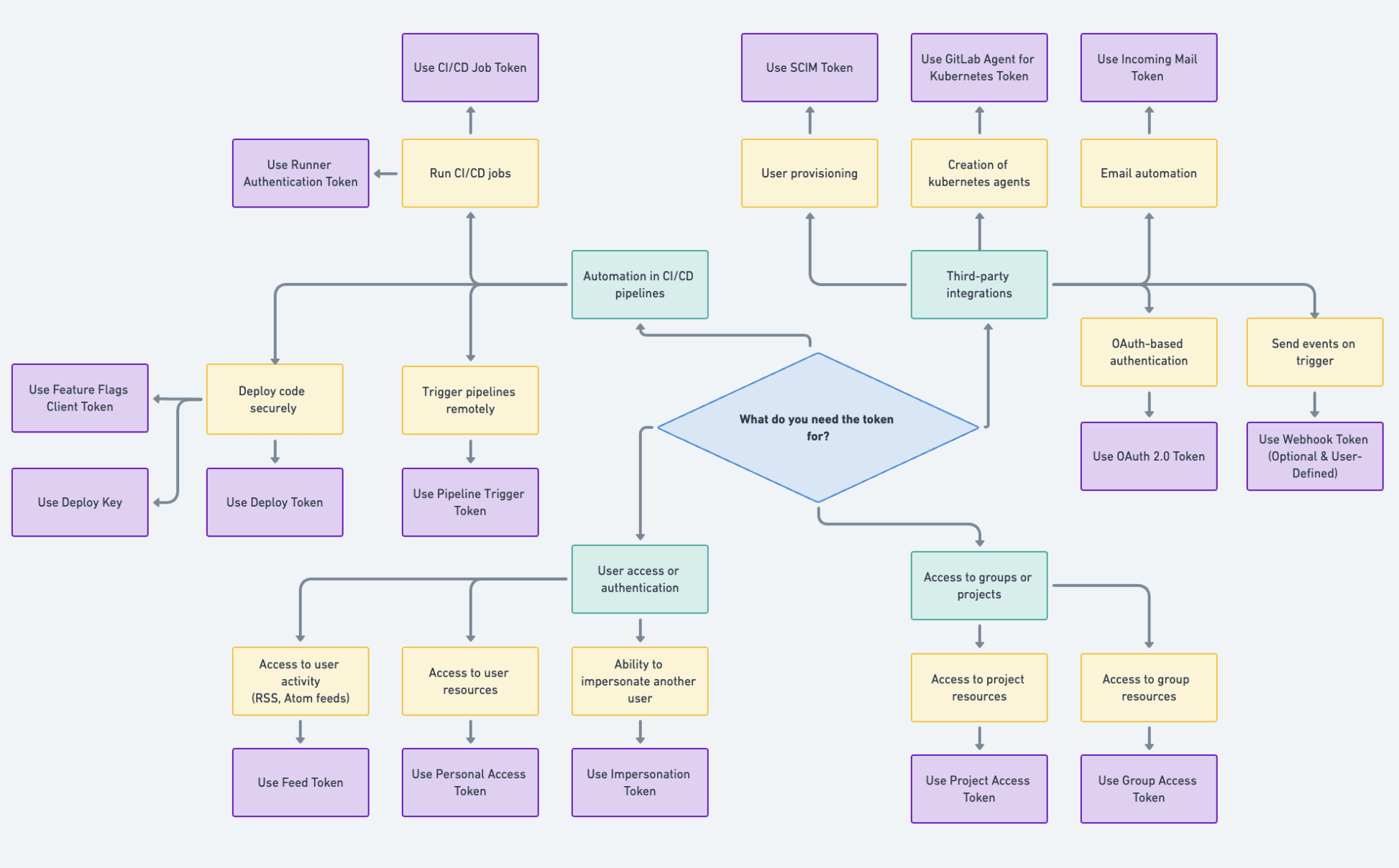
For the sake of simplicity, the chart illustrates a straightforward use case tied to single user ownership. For more information, check out our documentation of user roles and permissions at each namespace (user/group) in your instance or top-level group. Example use cases could be as follows:
- Personal access tokens (PAT) can be used by developers when a user's personal access and permissions are required. In this case, the credentials follow the status and permissions of the user, including the removal of access if the account loses access to a specific project or group (or is blocked entirely).
- Project/group access tokens (PrAT/GrAT) are recommended when access should be scoped to resources within a specific project/group, allowing anyone with a PrAT/GrAT to access those resources through mechanisms managed by assigned scopes.
Token types
Below is a list of GitLab tokens with their default prefixes and use cases. For more information, please visit the GitLab Token overview page.
| Tokens | Prefix | Description |
|---|---|---|
| Personal access token | glpat | Access user-specific data |
| OAuth 2.0 token | gloas | Integrate with third-party applications using OAuth2.0 authentication protocol |
| Impersonation token | glpat | Act on behalf of another user for administrative purposes |
| Project access token | glpat | Access data from a specific project |
| Group access token | glpat | Access data from a specific group |
| Deploy token | gldt | Clone, push, and pull container registry images of a project without a user and a password |
| Deploy keys | N/A | Allow read-only or read-write access to your repositories |
| Runner authentication token | glrt | Authenticate GitLab Runners |
| CI/CD job token | glcbt | Automate CI/CD processes |
| Trigger token | glptt | Trigger pipelines manually or programmatically |
| Feed token | glft | Authenticate access to package/RSS feeds |
| Incoming mail token | glimt | Process incoming emails |
| GitLab agent for Kubernetes token | glagent | Manage Kubernetes clusters via the GitLab agent |
| SCIM tokens | glsoat | Enable SCIM integrations for user provisioning |
| Feature flags client token | glffct | Enable feature flags programmatically |
| Webhook token | N/A | User set secret token to secure webhook payloads and ensure that the requests are from GitLab |
Discovering your tokens
Credentials inventory
On GitLab Ultimate, administrators (GitLab Self-Managed) and top-level group owners of an enterprise organization (GitLab.com as of Version 17.5) can monitor the credentials in their namespace.
This inventory tracks token details such as:
- Token type
- Available tokens on GitLab.com
- Available tokens on GitLab Self-Managed
- Associated user accounts
- Token scopes, and creation and expiration dates
- Token last used IP addresses (as of GitLab 17.10)
- Token filtration based on the above user-defined parameters
- Ability to revoke and rotate those tokens
A well-maintained credentials inventory helps identify over-permissioned tokens, and gives insight into credentials that may need to be rotated, ensuring a secure and efficient workflow.
Credentials inventory API
As a complement to the UI, there is ongoing development to release a credentials inventory API through the new /group/:id/manage endpoint. The credentials accessible under this endpoint are limited to enterprise users, and can be accessed by the top-level group owner of an enterprise organization. An example of the future API call would be:
curl --header "PRIVATE-TOKEN: <pat>" "https://verified_domain.com/api/v4/groups/<group_id>/manage/personal_access_tokens"
GitLab API
The GitLab API allows you to programmatically list and manage tokens within your organization. Key authentication-related endpoints support various token types), including personal, group, CI/CD tokens, and more. An example of using a personal access token to list all visible projects across GitLab for the authenticated user is:
      curl --header "PRIVATE-TOKEN: <your_access_token>" \
     "https://gitlab.example.com/api/v4/projects"
Watch this video to learn how to make API calls to the GitLab API.
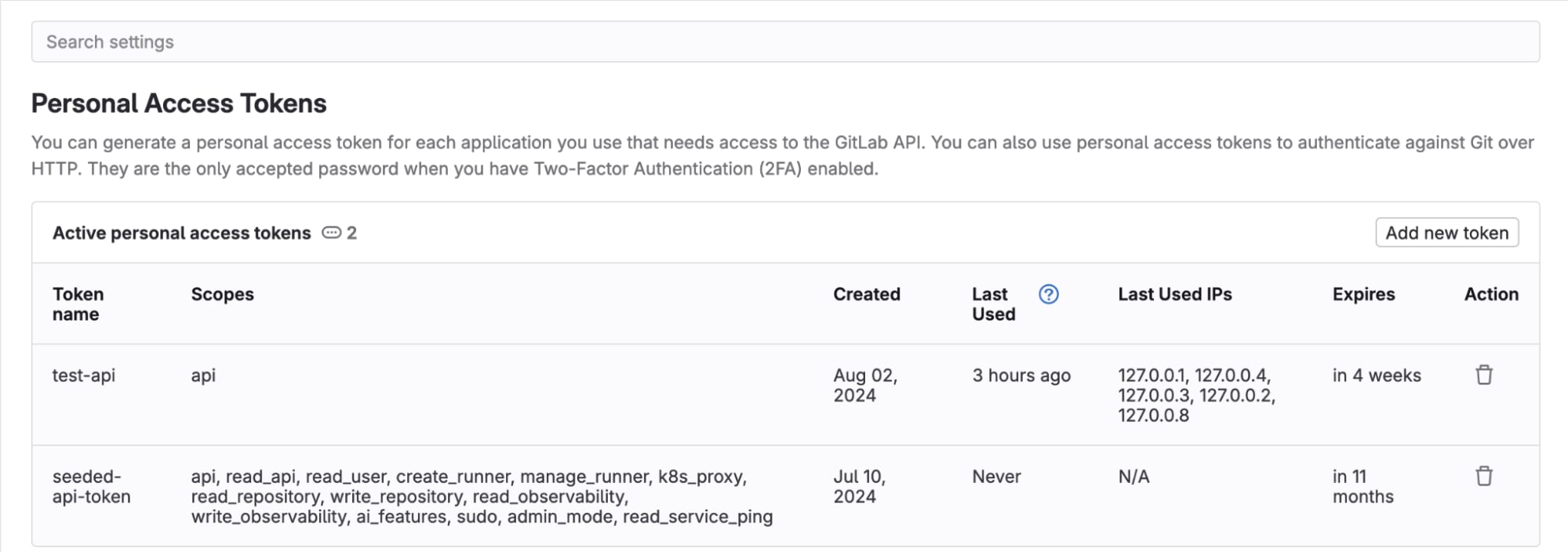
Finding where tokens are used
Customers can find where tokens are used in different ways:
- under User Profile > Access Tokens
- in credentials inventory
- in audit events
- via the API
Information on token usage is updated every 10 minutes for last_used and every minute for last_used_ip.
The ability to view IP addresses was introduced in GitLab 17.9, and is controlled by the
Managing tokens in the GitLab UI and API
The following table includes videos detailing a few token creations in the UI and demonstrates their usage via the API.
| Tokens | GitLab UI | GitLab API |
|---|---|---|
| Personal access token | Documentation and video | Documentation and video |
| Group access token | Documentation and video | Documentation and video |
| Project access token | Documentation and video | Documentation and video |
Token rotation and expiration management
Implementing token rotation and strict expiration policies reduces the risk of compromise and ensures compliance with security standards. Regular rotation and enforced expirations prevent stale credentials from becoming security vulnerabilities.
Previously, expired group and project access tokens were automatically deleted upon expiration, which made auditing and security reviews more challenging due to the lack of a record of inactive tokens. To address this, a recent feature introduced the retention of inactive group and project access token records in the UI for 30 days after they became inactive. This enhancement aims to allow teams to track token usage, expiration, and revocation for better compliance and monitoring.
To be more proactive in your token rotation and expiration management, do the following:
- Actively rotate your tokens via the UI or API. If you use the latter, be mindful of the automatic token reuse detection security mechanism.
- Set an instance-wide maximum lifetime limit for access tokens.
Token rotation API
Until GitLab 17.7, customers had to programmatically rotate access tokens with the API. Its counterpart is now available on the UI. Check out the video in the table below or follow the documentation for guidance.
Token rotation snippets
The following table includes videos detailing the rotation of GitLab tokens.
| Tokens | Prerequisites | GitLab UI | GitLab API |
|---|---|---|---|
| Personal access token | Scope: api | Documentation and video | Documentation and video |
| Group access token | Scope: api and Role(s): owner | Documentation and video | Documentation and video |
| Project access token | Scope: api and Role(s): owner, maintainer | Documentation and video | Documentation and video |
Token management best practices
Principle of least privilege
Mitigate risk by restricting assigned permissions to tokens required for their respective tasks. This allows you to proactively predict and troubleshoot points of failure in your systems. You can do this by:
- Selecting the right token for the right job. See the flowchart.
- Assign only the required scopes when creating a token. For example, use read-only scopes for tokens with auditor-like jobs. See roles.
- Avoid granting administrative privileges unless specifically required.
- Enforce instance-wide default token lifetimes.
- Regularly review and audit token permissions to ensure they align with current operational needs.
- Revoke tokens once the task is complete.
Service accounts
Service accounts ensure tokens are tied to non-human entities, separating them from individual user accounts and reducing dependency on specific users. Instead of using personal accounts to generate tokens for automation, create service accounts with limited scopes. Benefits include:
- Usage of service account tokens in CI/CD pipelines to avoid disruptions caused by user account changes
- Programmatically automate rotation processes, as personal accounts remain unaffected
- Clearer monitoring and auditing trail of actions taken by service accounts
- Service accounts with no expiration date
- Does not consume a license seat
GitLab plans to release a new Service Accounts UI as a counterpart to its API-based creation, designed to simplify the management of service accounts and their associated tokens. Check out the demo below on the programmatic usage of service accounts.
Vulnerability tools
Leverage GitLab’s built-in security tools to identify and mitigate vulnerabilities associated with token usage. For maximum coverage, it is recommended to use them all in tandem.
- Secret Detection: Scans your repository for hardcoded secrets like API tokens, passwords, and other sensitive information. View the list of detected secrets.
- Static Application Security Testing (SAST): Analyzes your source code for security vulnerabilities and provides reports with UI findings in merge requests, among other features.
- Dependency Scanning: Ensures that third-party libraries used in your project do not expose token-related vulnerabilities.
Audit logs and monitoring
Maintain token health by regularly reviewing audit logs and token usage, instance- and/or group-wide.
- Audit events: Enable audit event logging in GitLab to track token-related activities such as creation, usage, deletion and unusual API calls (unpermitted parameters in logs, and consistent triggers of the rate limiter).
- IP allowlisting: Helps prevent malicious users from hiding their activities behind multiple IP addresses.
- Alerts: Set up alerts for unusual activities (trigger paging for on-call rotations or be used to create incidents).
- Credentials inventory: Complete control of all available access tokens with the ability to revoke as needed.
- Notifications: Proactively handle any token (group, project, and personal) expiration notification emails you receive. Based on customer demand, this feature was recently extended to include 30-day and 60-day notifications from the seven-day default.
- Webhooks: Access token webhooks can be configured on groups and projects to send seven-day token expiry events. This feature was also recently extended to include 30-day and 60-day notifications behind the
feature flag (disabled by default).
What's next
With GitLab’s large token catalog, there are ongoing plans for consolidation with a focus on the lifetime, fine-grained scopes, consistent management, and usage. Our current prioritized token-related features include a complete UI for service accounts, additional credential types in the credentials inventory, and improved auditing for tokens and service accounts.
Sign up for a free trial of GitLab Ultimate to start using token management.
We want to hear from you
Enjoyed reading this blog post or have questions or feedback? Share your thoughts by creating a new topic in the GitLab community forum.
Share your feedback